

The most important tab – in my perspective – for handling authorizations is the equally called tab within the PFCG when editing/viewing a role. This is the central component to design customized authorizations and is central especially for Business Intelligence developments, due to its special concept.
A security expert that classically solely works within ERP or S/4HANA environments will of course disagree and refer to the SU24 for the central component of authorization design. And this is true – when working with transactional authorizations. Often though, a security expert also needs to be able to handle SAP Business Warehouse (BW) authorizations. And therewith a management of those specific non-transactional authorizations such as analysis authorizations (S_RS_AUTH) or InfoProvider-specific authorizations (S_RS_HCPR for CompositeProviders or the now to be obsolete S_RS_ICUBE).
How to Edit or View Authorizations of a Role
Once you clicked either on the view or edit symbol within the PFCG “start screen”, you can navigate to the tab “Authorizations“. At this tab you have several information for the correct auditing as well as the authorization profile information.
Before editing the authorizations, you need to be aware of some delicate settings, when clicking on it.
First Contact with Change Role: Authorizations
If you navigate there for the first time it is straight forward click on the below highlighted icon “Expert Mode for Profile Generation“.
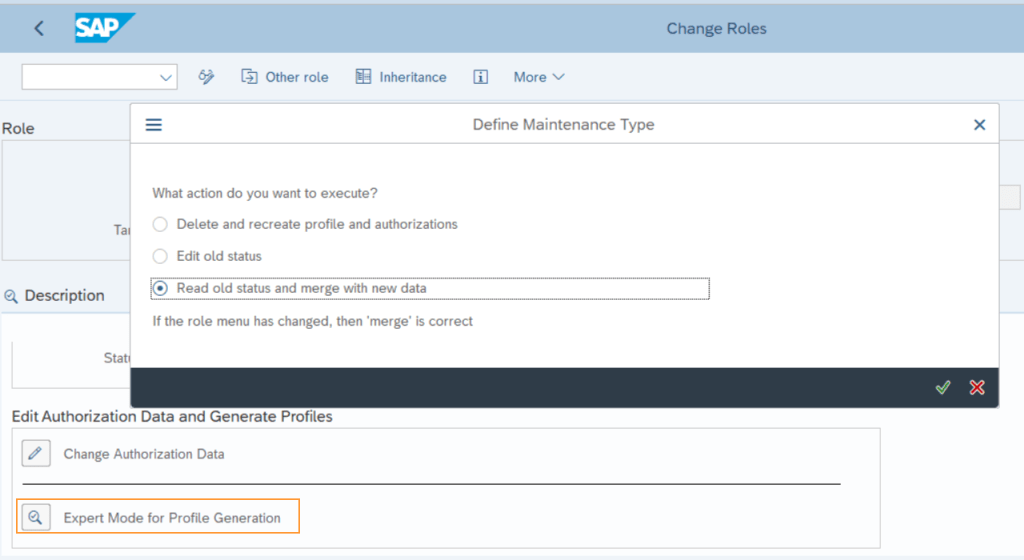
If you clicked this the first time with your current session user, the below message occurs:

This is important information on the SU25, that is centrally for authorization management and is strongly connected to our important SU24. SAP itself states the SU25 definition like this:
SAP may deliver new authority-checks and/or new proposals for PFCG. There exists no central documentation about such changes. To help customers to integrate such changes into the existing role concept, SU25 is provided.
Source: SAP, https://wiki.scn.sap.com/wiki/display/Security/SU25, last checked on March 13th, 2021
Hence, the SU25 simply provides SAP standard default values, that fill the authorizations when assigning a transaction to a role (compare to my blog entry Role Editing – Menu Roles). The topic SU25 will be discussed more in detail within another blog entry.
Expert Mode
Not only for experts
If you are working with authorizations it is crucial to use the expert mode “Expert Mode for Profile Generation”, since the standard button above has not the perfect settings behind and can lead to inconsistencies.
Simply memorize: always use the expert mode and choose the action “Read old status and merge with new data“. This keeps your authorizations up-to-date with the SU24 default values and is the right way to go.
After having opened the authorizations tab you are ready to go. If it is the first time for your session user to open this tab with no defined authorizations, the system automatically prompts you templates. Generally this is the part where SAP plays its aces: SAP provides a huge portfolio of role templates. Those templates provide a very good fitting set of all relevant authorizations. Hence, they already did most of your job by considering interdependencies of the authorizations.

Starting from this prompt it is up to you if you want to use a template or just go and fully customize. Both ways are valid.
Please let me know if this entry helped. Did you find what you looked for? Was the described content clearly structured and well readable?


Thanks for your feedback!
Make a one-time donation
Make a monthly donation
Make a yearly donation
Choose an amount
Or enter a custom amount
Your contribution is appreciated.
Your contribution is appreciated.
Your contribution is appreciated.
DonateDonate monthlyDonate yearly SAP Authorization Universe
One thought on “PFCG Roles – Authorizations Part I”